The Lost Realms
How to add to the game with a browser extension — riding the conventions the engine happens to have, rather than an API it deliberately does not publish.
Start HereWhat a mod is here
A mod for The Lost Realms is an ordinary browser extension. It is not a plugin, it is not installed into the game, and the game does not know it exists. It runs as a content script in the same page, reads the same DOM the player is looking at, and adds whatever it adds by putting elements into that DOM itself.
There is no build step, no packaging, no manifest generator, and — the part that surprises people — no mod API. The engine publishes nothing for you to call: no window.TLR, no registerBlock, nothing to import. The one thing it does publish is a DOM event (Part III), which is not an API in the sense that matters here — it announces, and there is nothing on it to call.
You can do a surprising amount. You can read anything on the page, draw anything into it, persist your own data, and read the player's own saved preferences. Being told that something happened — a fight starting, a room being entered, an item being equipped — is the event bus, which is built and live: thirteen announce-only events, eleven of them broadcast cross-window too.
The whole of it fits in one folder: Extensions/SampleBlock/. Four files, about a hundred and fifty lines. Everything here, that folder demonstrates.
Forking the sample
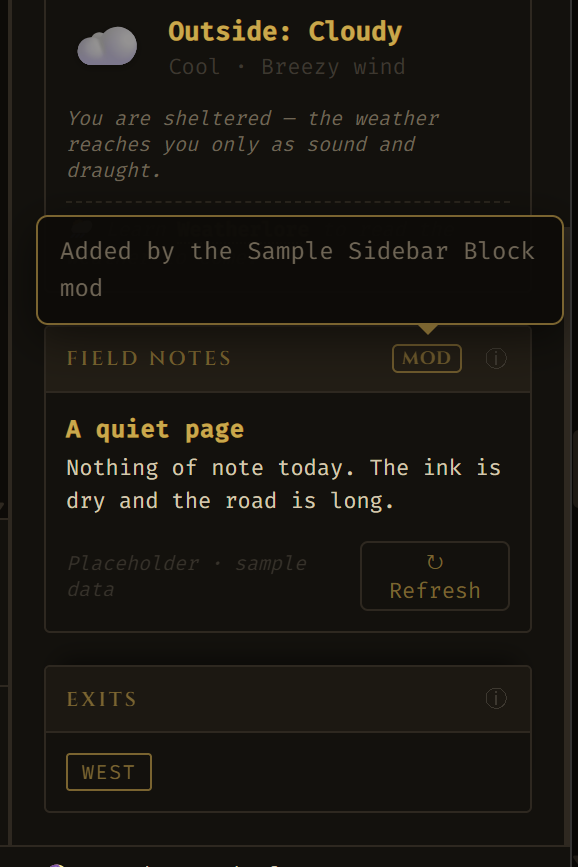
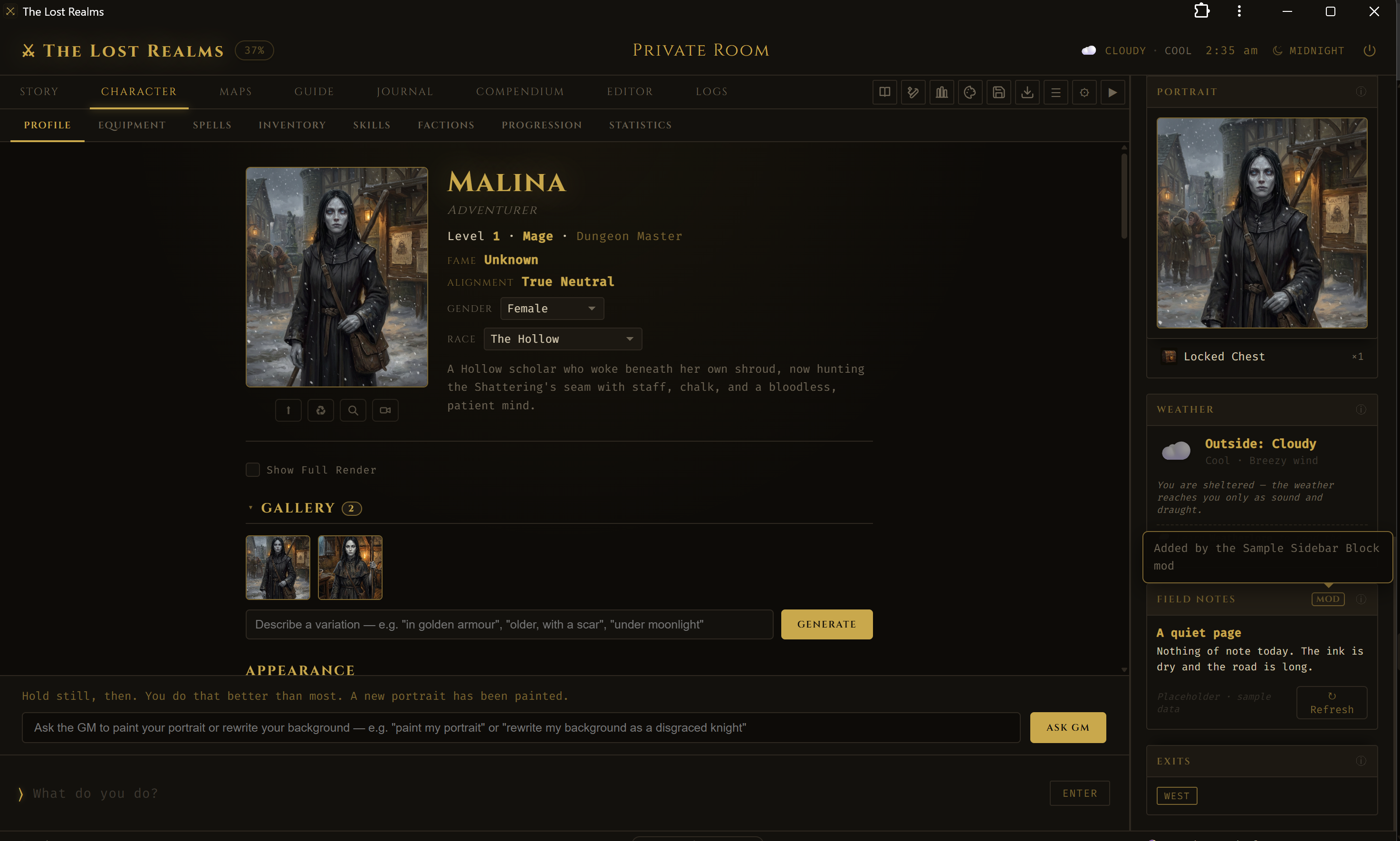
The sample adds a Field Notes block to the game's sidebar. It exists to be forked, not to be useful — the content is placeholder, and the point is the wiring around it.
| File | What it holds |
|---|---|
manifest.json | Manifest V3. Declares the content script, its CSS, and the pages it runs on. |
content.js | Recognises the game page, builds the block, injects it, renders the body. |
block.css | Styles the injected card only, reusing the game's CSS variables so it follows the active theme. |
README.md | Fork instructions, the reserved keys, and the hosts it runs on. |
Installing it
- Open
chrome://extensions. - Turn on Developer mode.
- Load unpacked, and choose the
Extensions/SampleBlockfolder. - Opening the game from disk rather than a server? Open the extension's Details and allow access to file URLs.
- Load or reload the game. The block appears in the sidebar.
What to change
Everything you need sits at the top of content.js: BLOCK_KEY (your block's identity — see The sidebar for what a collision does), then MARKER_ID, BLOCK_TITLE and BLOCK_INFO, then SAMPLES and bodyHTML(), which is the part you actually replace.
.sample-mod-card will style each other. The engine namespaces nothing on your behalf, and neither does the browser.Where your mod runs
A content script only runs on pages its manifest names. The sample declares six patterns, and the shape of that list matters more than its length.
| Pattern | Reaches |
|---|---|
http://localhost/*, https://localhost/* | The vault, in either mode. |
http://127.0.0.1/*, https://127.0.0.1/* | The same machine, by address. |
https://*.thelostrealms.ai/* | The public deployment, bare domain and subdomains alike. |
file:///*text_adventure.html | The game opened straight from disk. |
A pattern's host ignores the port, so one localhost entry covers the vault whatever port it started on. But localhost and 127.0.0.1 are different hosts to the browser, and the vault serves HTTPS as readily as HTTP — so those four are a matrix, and leaving a cell out is a silent no-show on somebody's setup rather than an error anyone can see.
https://*/* would end the question permanently, and the price is that your content script is injected into every page your users visit. The page check makes that harmless, not absent — and it is a permission you would ask every user of your fork to grant forever, to save yourself one line. If you genuinely need to follow the game wherever it is hosted, use optional_host_permissions with chrome.scripting.registerContentScripts, which asks for one host at the moment the user points you at it.What a mod rides
None of this is an interface. It is how the engine happens to work, written down — with a section on which parts of it cannot change without somebody noticing.
The two worlds
This is the one piece of browser mechanics you cannot skip, because everything confusing about mod behaviour comes from it.
Your content script shares the page's DOM and its origin storage. It does not share the page's JavaScript. The engine's functions live in the page's main world; your code lives in an isolated one. You can see every element the engine drew, and you cannot call a single function it defined.
| You want to… | So you… |
|---|---|
| Read or change what is on screen | Use the DOM directly. It is shared. |
| Read the player's saved preferences | Use localStorage. Same origin, same data. |
| Reuse an engine behaviour, like collapsing a block | Copy the engine's own inline onclick into your markup. Inline handlers run in the main world, so they reach the engine's functions. |
| Run your own logic on a click | Use addEventListener from your script — that runs in your world, where your code lives. |
The sample demonstrates both on purpose: its header collapse is an inline handler calling the engine's own function, and its refresh button is a listener bound from the content script. If you have ever wondered why one control in a mod can reach the engine and another cannot, that is the whole of it.
<script> into the page to run code in the main world, and from there call anything the engine defines. It works. It also makes your mod a private fork of internals nobody agreed to keep stable, and two mods patching the same function is a bug no one can debug. Needing it usually means the engine is refusing to say something it should say — which is worth reporting.Storage the player owns
Because your script shares the page's origin, it reads and writes the same localStorage the engine does. Three keys describe the sidebar, and a mod that honours them behaves like part of the game rather than a thing bolted to it.
| Key | Holds |
|---|---|
tlr_sidebar_blocks | Which blocks the player has shown or hidden, from the block menu. |
tlr_sidebar_collapsed | Which blocks are folded shut, from clicking a header. |
tlr_sidebar_order | The top-to-bottom order the player dragged the blocks into. |
Each is JSON: the first two are objects keyed by block key, the third an array of keys in order. The engine writes them when the player acts and applies them at boot. The sample reads the first two on injection, so a block the player had hidden or folded comes back the way they left it. It does not read the third — it does not have to, because the engine re-applies the saved order when it notices a block arrive.
tlr_ prefix — that space belongs to the engine and it does not know you are in it. Note too that localStorage is per-origin: the same mod on localhost and on the hosted game is looking at two different stores.Mods for the DM role
Some mods are for the person running the world rather than the person playing it — an encounter table, a quest-state readout, a notes panel. The engine has this idea for its own interface: every element carrying dm-only is shown or hidden according to whether the current character is a DM. Put that class on your block and it follows the same rule.
Two mechanisms, and you can use both: ride dm-only for what your block draws, and listen for the event bus's onDMLogin to decline injecting at all unless a DM arrived — it fires alongside onPlayerLogin, never instead of it, so check for it rather than assuming a login is one or the other.
The failures that never error
What goes wrong with a mod usually goes wrong silently. These are the ones worth knowing before you ship, and the honest account of what you can rely on.
Part IISix ways to break quietly
None of these throws. That is what they have in common, and why they are worth reading before you ship rather than after somebody reports that the game “went odd”.
1 · A key that collides
Two blocks sharing a data-section produce two menu rows that toggle one thing, and a collapse that resolves to whichever the page found first. The template checks the live sidebar and refuses to inject — but only because it was written to. Your fork keeps that check only if you keep it.
2 · Injecting before the page is the game
A content script runs on every page its manifest matches, and matching a whole host means matching pages that are not the game. Recognise the game before you touch anything — the template looks for the sidebar's signature Exits block — or you will be drawing into somebody's unrelated tab.
3 · Assuming the game is up when your script runs
Content scripts run at a moment of the browser's choosing, not the game's. The template still hedges with an observer and a timeout, but the event bus's onGameReady is the better signal now — it fires when a session is playable rather than merely when the page is up, and can fire more than once per page, so a fork wired to it should keep its setup idempotent rather than keep polling.
4 · Building HTML out of strings you did not write
The template renders with innerHTML and canned content, which is safe because the content is a constant in the file. The first thing most forks do is replace that constant with something fetched, computed, or read off the page — and at that moment the pattern stops being safe. Build nodes and set textContent for anything you did not author yourself.
5 · Doing real work on a hot path
Anything you attach to a frequent engine action runs as often as that action does, and the engine saves state many times a turn. If your handler does real work, the game stutters in a way no profiler points at your extension.
6 · Showing the player something they had not earned
Your mod can read the whole page, including what the player has not discovered. A block that helpfully lists what is in the room, or what a container holds, turns a field guide into a cheat by accident. Nothing stops you; that is the point of the warning.
What is defended
This is the honest answer to “can I rely on this?”, and it is worth more than a compatibility promise would be, because it is checkable.
Nothing in this guide is an API. Every convention it describes is an observation of how the engine currently works, and the engine is free to change. What you can rely on is narrower and more useful: the conventions a test names are the ones that cannot change silently. A change that breaks them turns a build red, in front of the person making it, before it lands.
| Convention | Defended by |
|---|---|
| An unrecognised block key keeps its live position; a block arriving late gets the saved order and a drag handle | Tests/test_sidebar_reorder.js |
A mod block carrying dm-only is gated the moment it arrives, and one without it is left alone | Tests/test_sidebar_reorder.js |
| The template's reserved-key list matches the engine's, key by key | Tests/test_extension_docs.js |
| The template's documented hosts match its manifest, in both directions | Tests/test_extension_docs.js |
| The template carries no copied roster, and checks the live sidebar instead | Tests/test_extension_docs.js |
Learning that something happened
A mod can find, read, draw and persist. Learning that something happened — a fight starting, a room entered, an item equipped — is what the event bus adds, and it is built and live.
Part IIIThe event bus
tlr-mod-events as well, so a listener in another window hears the game. Nothing on this page is proposal any more. The table below says which is which, and it is the only place to trust on that question.Before this existed the options were to poll on a timer (wrong by the interval, and throttled when the tab is in the background), to infer an event from a rendering (a guess, and it fires on a restore too), or to patch engine internals (the worst of the three). All three existed because there was no moment to subscribe to.
What replaces them is announce-only notification — you learn that something happened, and never get a vote on whether it does. There is no veto, no return value the engine reads, and no way to make the game wait for you. Two transports, because there are two boundaries: a CustomEvent on document to cross into your isolated world, and (later) a BroadcastChannel to reach another window. One envelope shape for everything.
Subscribing
One listener, on document, for every event. You switch on type yourself — which is deliberate, because it means a subscriber can be written before it knows what it will be subscribing to, and a new event on the roster does not need a new listener.
// content.js — in your content script, which runs in the ISOLATED world.
// The DOM is shared with the page; the JS globals are not. There is nothing to import
// and nothing to register: the event is the whole interface.
document.addEventListener('tlr-event', function (ev) {
  const e = ev.detail;              // the envelope
  if (!e || e.v !== 1) return;      // a future envelope version is not yours to guess at

  switch (e.type) {

    // Replaces the MutationObserver and the fifteen-second timeout the template
    // ships with. Fires when a session is playable — not when the page is up.
    // It can fire MORE THAN ONCE per page, so keep setup idempotent.
    case 'onGameReady':
      if (!ready) { ready = true; inject(); }
      break;

    // A player carrying the DM role. Fires alongside onPlayerLogin, never instead
    // of it. Use it to decide what you DRAW — see Chapter 6 on why it is a mode
    // and not a permission.
    case 'onDMLogin':
      document.body.classList.add('my-mod-dm');
      break;

    case 'onPlayerLogout':
      ready = false;
      teardown();
      break;

    case 'combatStarted':
      // e.detail is per-event. It is a COPY: the engine cloned it on the way out,
      // so mutating it changes nothing in the game and keeping it is safe.
      note('Fight: ' + e.detail.enemies.join(', ') + ' — ' + e.gameAt);
      break;

    case 'combatEnded':
      note('Fight over: ' + e.detail.outcome);
      break;
  }
});

// Listening in a SECOND window (the Dungeon Builder, the Viewer, another tab)?
// Subscribe to the channel instead — or to both, if your mod runs in either.
const seen = new Set();
new BroadcastChannel('tlr-mod-events').onmessage = ev => handle(ev.data);
document.addEventListener('tlr-event', ev => handle(ev.detail));

function handle(e) {
  if (!e || e.v !== 1) return;
  if (seen.has(e.id)) return;   // the same event, arriving the other way
  seen.add(e.id);
  // … your switch on e.type …
}
The envelope
Every event arrives in the same shape, so the fields below are always there whatever type says.
| Field | What it is |
|---|---|
type | Which event. One of the thirteen live names below; the roster is closed, so an unknown one is a bug in the engine rather than something for you to handle. |
v | The envelope version, currently 1. Not the engine's version. Check it and bail on anything else — and note that a field being ADDED does not bump it, because that would reject every mod written against the old shape over a change that breaks none of them. It bumps when a field is removed, renamed, or given a different meaning. |
id | Unique to this event, for as long as the page lives. It is here so that an event arriving on two transports at once (the cross-window half, for the eleven events that cross) is recognisable as a copy and you can discard it. Keep the ids you have acted on if you ever subscribe on both. |
at | Wall clock, in milliseconds. For ordering, and for “how long ago”. |
gameAt | The in-world clock as a string, in the realm's own calendar — the same words the header shows. This is what you display. |
worldUid | Which realm it came from. Scope anything you persist by this. Two windows can be open on two different realms and, for the cross-window events, will hear each other; a mod that ignores worldUid will act on the wrong one. |
detail | Per-event, and deliberately small — the minimum the event's name implies. combatStarted gives you the participants' names, not their stat blocks. |
| Event | Status | What it means, and what it carries |
|---|---|---|
onGameReady | Live | A session is playable: the world and player exist, the overlay is down and the input accepts a turn. Not “the page is up” — for that, keep injecting at document_idle. Fires after onPlayerLogin on every path in, and can fire more than once per page, because logging out and back in makes a session playable a second time. Carries { name, isDM }. |
onNewGame | Live | A character entered a world having chosen New Game — not a Continue, not a refresh. Nothing records that a game is new: the checkbox is read into a local and never persisted, so this event is that fact, emitted from the one path that reaches it. It carries the union of what onGameReady and onRoomEnter would tell you, because on this path both are true at once — { name, isDM, class, roomId, roomName }. Both still fire in their own right a moment later; this is a shortcut, never a replacement. |
onPlayerLogin | Live | Somebody entered a game — a new character, a Continue, or a page refresh that auto-resumed. Defined as the transition, not as a function call, so a restore that finds a session already logged in is not a login. Carries { name, isDM }. |
onDMLogin | Live | Fires alongside onPlayerLogin, never instead of it: there is no DM sign-in, only a login-screen checkbox carried in the save, so a DM login is a player login with one flag set differently. Carries { name }. |
onPlayerLogout | Live | The session ended and the login screen is coming back. Carries { name }. |
onRoomEnter, onRoomExit | Live | The room being played in changed. Exit fires first, naming where the player left; enter follows, naming where they are. Derived from the single moment the engine describes a room, so fleeing a fight and a Game Master teleport are the same event as walking. It does not fire for re-reading the room you are standing in, for resuming a save, or for importing a character — none of those is a journey. Each carries { roomId, name }. |
beforeEquip, afterEquip | Live | Gear going on, from the one writer the paper doll and the Game Master’s directive both go through. before is announce-only and means the last moment the old state is readable — you cannot refuse it, and it is emitted after the class check, so it never precedes an equip the engine then declines. Carries { slot, label, item, stored, replacing } and { …, replaced }: slot is the doll key the engine writes, label is what the player sees on it, and stored is the difference between wearing a thing and carrying it, which the key alone cannot tell you. |
beforeUnequip, afterUnequip | Live | Gear coming off, from the matching shared writer. Also fires when a DM removes an item from the catalog while it is being worn, because it genuinely comes off. Each carries { slot, label, item, stored }. |
combatStarted | Live | A fight is standing: the foes are settled and the round clock is running. Carries { enemies } — their names, not their stat blocks. |
combatEnded | Live | The fight is over and torn down, so the room you read in response is the one it left behind. Carries { outcome, enemies }. |
Crossing the window. Every event above except beforeEquip and beforeUnequip is also broadcast on a BroadcastChannel named tlr-mod-events, so a mod in the Dungeon Builder, the Viewer or a second tab can hear the game window. The two before* events do not cross, and cannot: their name promises “the last moment the old state is readable”, and an asynchronous transport arrives after the engine has moved on. A cross-window mod therefore sees the after* half of a gear change and never the before* — by design, not by omission. | ||
onGameReady replaces both, and injecting after it lands your block into a game that exists rather than into a login screen.One question in that design was about browsers rather than about design — whether a CustomEvent's detail survives the crossing into an isolated world — so it was settled by running it rather than by agreeing. It survives, on Chromium 141, in both directions, and it arrives as a structured clone: a Map is still a Map on your side, a Date is still a Date, and a circular reference still points back at itself. It is a copy, not a window into the engine's memory — the game can change the object a microsecond after handing it to you and you will never see the change. BroadcastChannel crosses into your world too; the same-document event keeps its place because it is synchronous and the other is not.
null, indistinguishable from an event that deliberately carried nothing. You will not be sending those, because the engine decides what an event carries and every payload on the roster is plain data; it matters if you ever relay one of these events onward with a payload of your own, because that is where a stray callback would get in.Extensions/BusProbe — a diagnostic extension that subscribes to tlr-event, checks every envelope against the contract above, and shows the verdict in a sidebar block while you play. It is the fastest way to tell “my listener is wrong” from “the engine emitted nothing” from “the payload did not survive the crossing”, which otherwise all look identical. A zero event count is not a pass, and it says so.The full reasoning, the chokepoint costs measured against the engine, the measurements and the decisions already taken live in Designs/modding.html.
Reference
Appendix AQuick reference
Block keys the engine already uses
As of this edition: portrait, character, wealth, inventory, equipment, magic, items, people, weather, exits. The list the engine actually keeps is SIDEBAR_SECTION_ORDER in text_adventure.html — read it there rather than trusting this line, which is a snapshot and has been wrong before.
Storage keys the engine owns
tlr_sidebar_blocks · tlr_sidebar_collapsed · tlr_sidebar_order
Where the sample runs
http://localhost/* · https://localhost/* · http://127.0.0.1/* · https://127.0.0.1/* · https://*.thelostrealms.ai/* · file:///*text_adventure.html
The block markup, in brief
- Section:
class="sidebar-section",data-section="<key>" - Header:
class="sidebar-header",id="header-toggle-<key>", plus the engine's inline collapse handler - Body:
class="sidebar-body",data-body="<key>" - Add
dm-onlyto the section to have it follow the DM role
Further reading
Extensions/SampleBlock/— the template, and its READMEDesigns/modding.html— the design document: why there is no API, and the event bus in fullHandbook/modders-guide-book.html— the same material as a printable bookTests/test_extension_docs.js,Tests/test_sidebar_reorder.js— the conventions that cannot change silently
Appendix BAbout this guide
This is the screen-reading companion to Handbook/modders-guide-book.html, which carries the same material laid out for print. Both are styled after the game itself — this one after the Field Guide, in the game's own palette and typefaces; the book after the Player's Handbook, on cream paper with a cover.
The Lost Realms · Modder's Guide · styled after the Field Guide. Copyright © 2026 Brave You Worlds, LLC. All rights reserved. This guide is Game Content, not software: licensed under LICENSE-CONTENT, with no Change Date — it does not become open source on any future date, the way the engine does. Free to read, print and use in personal or non-commercial play, permanently; commercial use needs a separate licence — licensing@braveyouworlds.com.